
- Not all sellers and service providers accept credit cards, but some accept bank or e-wallet transfers.
- With Metrobank PayNow, eligible Metrobank credit cardholders can use their available credit limit to send payments for eligible purchases of goods and services to supported local bank accounts and e-wallets, even without a credit card terminal.
- PayNow can be useful for family support expenses such as rent, tuition and school expenses, and household repairs and services, as well as payments to suppliers and local sellers, professional fees, and shopping. However, not every type of payment is automatically eligible. Transactions must comply with Metrobank's PayNow terms and involve supported recipient banks or e-wallets.
Not all sellers and service providers accept credit cards, but some accept bank or e-wallet transfers.
With Metrobank PayNow, eligible Metrobank credit cardholders can use their available credit limit to send payments for eligible purchases of goods and services to supported local bank accounts and e-wallets, even without a credit card terminal.
When can PayNow come in handy?
PayNow can be useful for family support expenses such as rent, tuition and school expenses, and household repairs and services, as well as payments to suppliers and local sellers, professional fees, and shopping. However, not every type of payment is automatically eligible. Transactions must comply with Metrobank's PayNow terms and involve supported recipient banks or e-wallets.
Another advantage is flexibility. Both the transfer amount and the processing fee are charged to the credit card and reflected in the cardholder’s monthly statement. This gives cardholders some time between their statement date and their payment due date before the balance has to be settled. This allows them to make important payments when needed while managing their cash flow more effectively.
How to send money through Metrobank PayNow
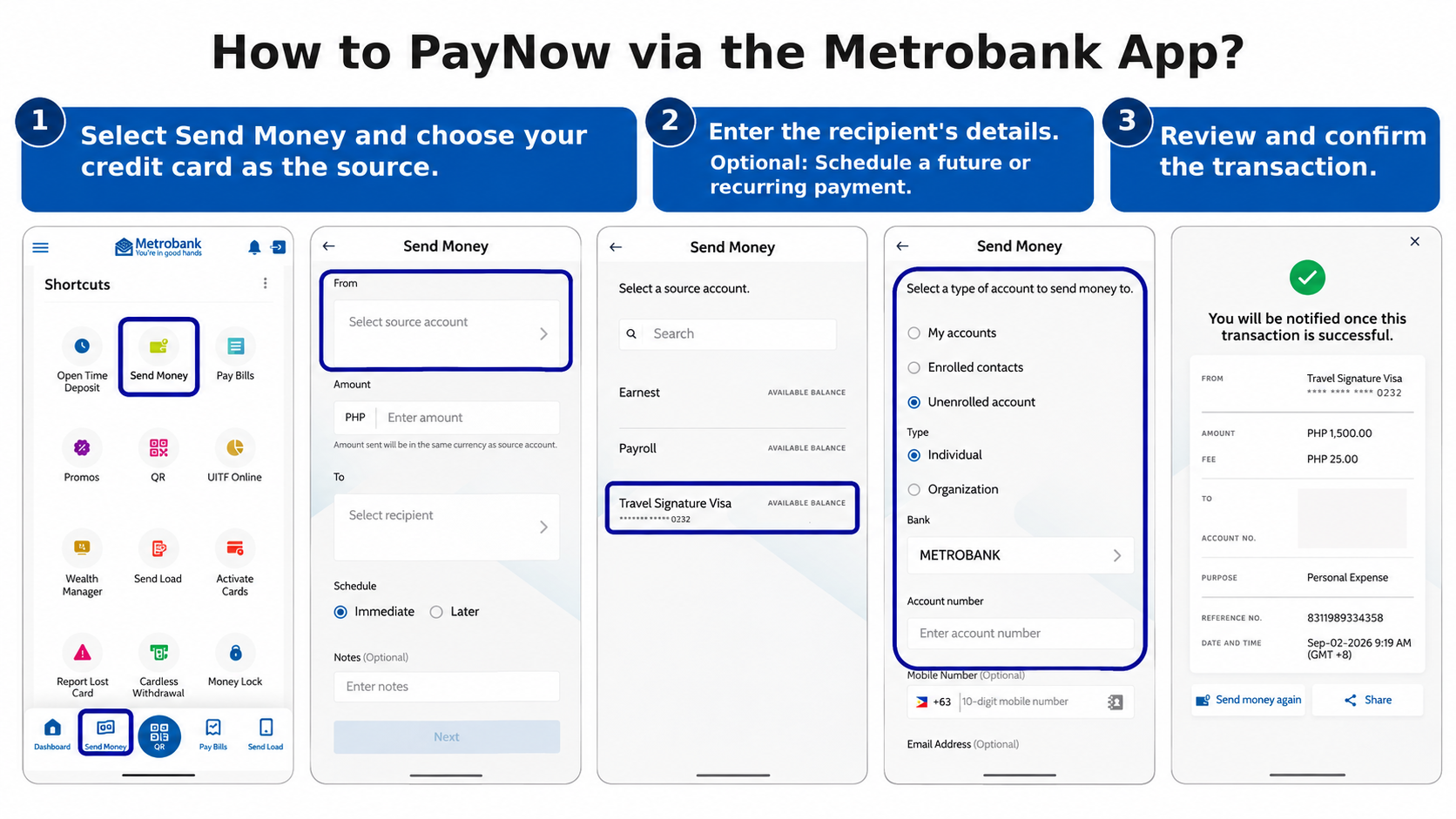
PayNow is accessed through the Metrobank App. Here’s how to complete a transaction:
1. Select Send Money and choose your credit card as the source.
Log in to the Metrobank App, tap Send Money, and select your eligible Metrobank credit card to fund the transaction.
2. Enter the recipient's details.
Provide the required information, including the recipient's name, bank or e-wallet, account number, and the amount to be sent. Check the details carefully before proceeding to avoid sending money to the wrong account.
Optional: Schedule a future or recurring payment.
To schedule a payment, select Later under Schedule. Choose One Time or Repeating. For recurring payments, set your preferred frequency, start date, and when the payments should end, either on a specific date or after a set number of occurrences.
3. Review and confirm the transaction.
Check the recipient information, transfer amount, and applicable processing fee. Complete the required security verification to authorize the transaction. The app will indicate that your transaction is being processed. You will receive an SMS and email confirmation once the PayNow transaction is successful.
How much does PayNow cost?
Every PayNow transaction carries a processing fee of ₱25 or up to 1.65% of the transaction amount, whichever is higher.
The fee is charged upfront and is separate from the amount being sent. Both the transfer amount and the processing fee are charged to the selected Metrobank credit card and included in the cardholder's monthly statement.
For example, if you send ₱10,000 and the applicable fee is 1.65%, the processing fee is ₱165, bringing the total amount charged to your credit card to ₱10,165.
This means PayNow uses the card's available credit limit, but it does not defer payment indefinitely. Cardholders must settle the resulting credit card balance according to their statement's payment due date. Any unpaid amount may be subject to the card's usual interest and charges.
How secure is PayNow?
Security checks help protect transactions.
Metrobank requires cardholders to authenticate PayNow transactions through built-in security measures. Users can authorize transfers using AppKey or their six-digit passcode, together with a one-time password (OTP) sent to their registered mobile number.
These checks help verify that the person initiating the transfer is authorized to use the credit card. Cardholders should never share their OTP with anyone, including people claiming to represent the bank.
For more information, visit the official Metrobank PayNow page.
Want to use PayNow for your payments and purchases?
It starts with a Metrobank credit card.
No Metrobank credit card yet? Apply through KKB here.